
FFmpeg 2026: The Open-Source Multimedia Framework Powering the Internet
When you stream a movie on Netflix, watch a clip on YouTube, join a video call on Discord, or edit footage in DaVinci Resolve — a piece of open-source software is almost certainly doing the heavy lifting somewhere in the pipeline.
That software is FFmpeg. And most people have never heard of it.
FFmpeg processes more multimedia data than any software in history. It is the invisible engine behind nearly every video and audio experience on the internet. Yet it is maintained by a small group of volunteers, funded by sporadic donations, and governed by a community that once split in half over a commit policy disagreement.
Here is everything you need to know about FFmpeg in 2026.
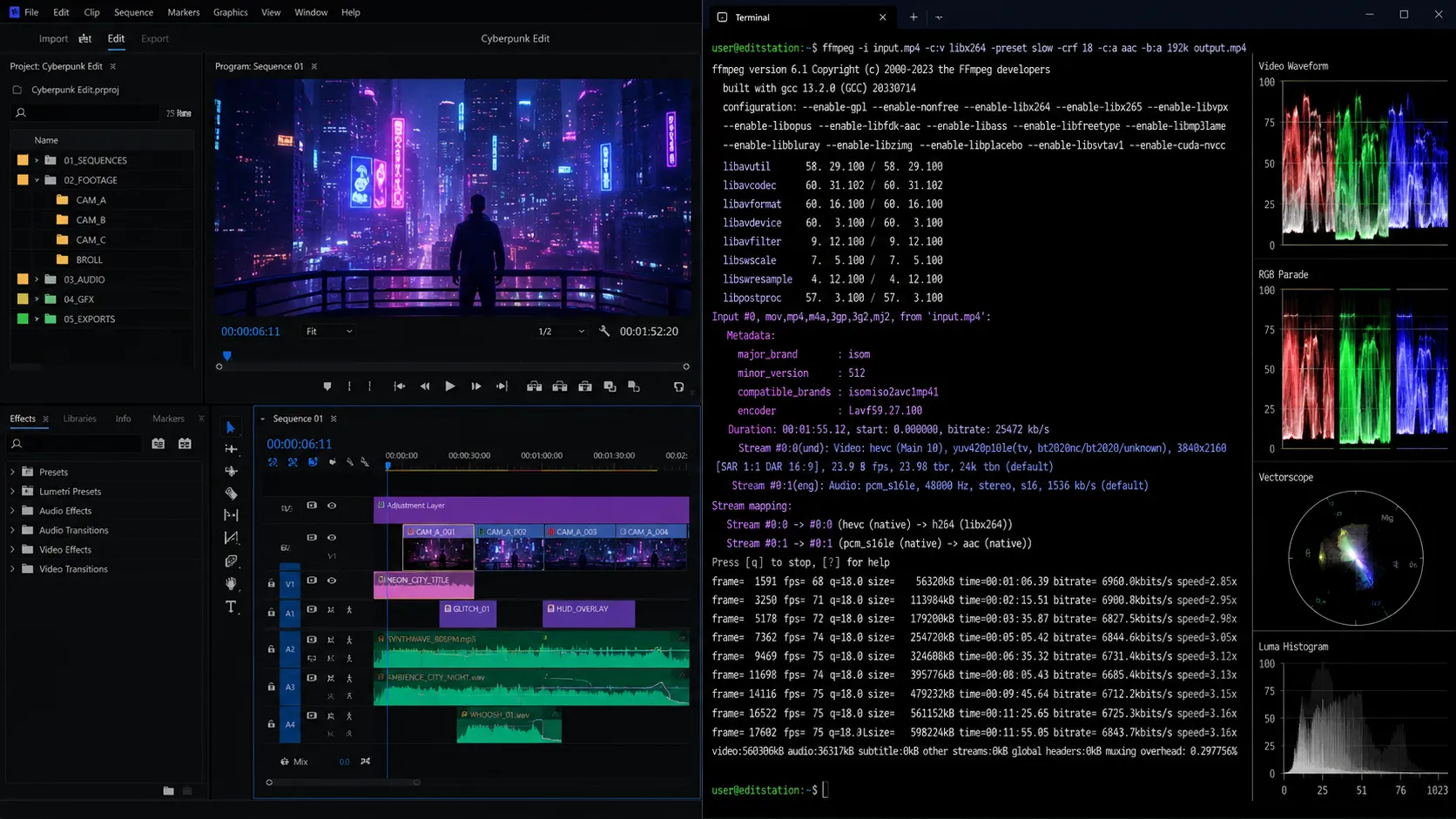
Image: FFmpeg's command-line interface in action — the Swiss Army knife of multimedia processing.
What Is FFmpeg?
FFmpeg is a free, open-source software project that handles virtually every aspect of multimedia processing — decoding, encoding, transcoding, muxing, demuxing, streaming, filtering, and playback of audio and video in nearly any format ever created.
The name breaks down simply: FF stands for "Fast Forward" (a nod to VCR controls), and mpeg references the Moving Picture Experts Group, the standards body behind the MPEG family of codecs and container formats.
At its core, FFmpeg is a complete, cross-platform solution to record, convert, and stream audio and video.
The FFmpeg Toolbox
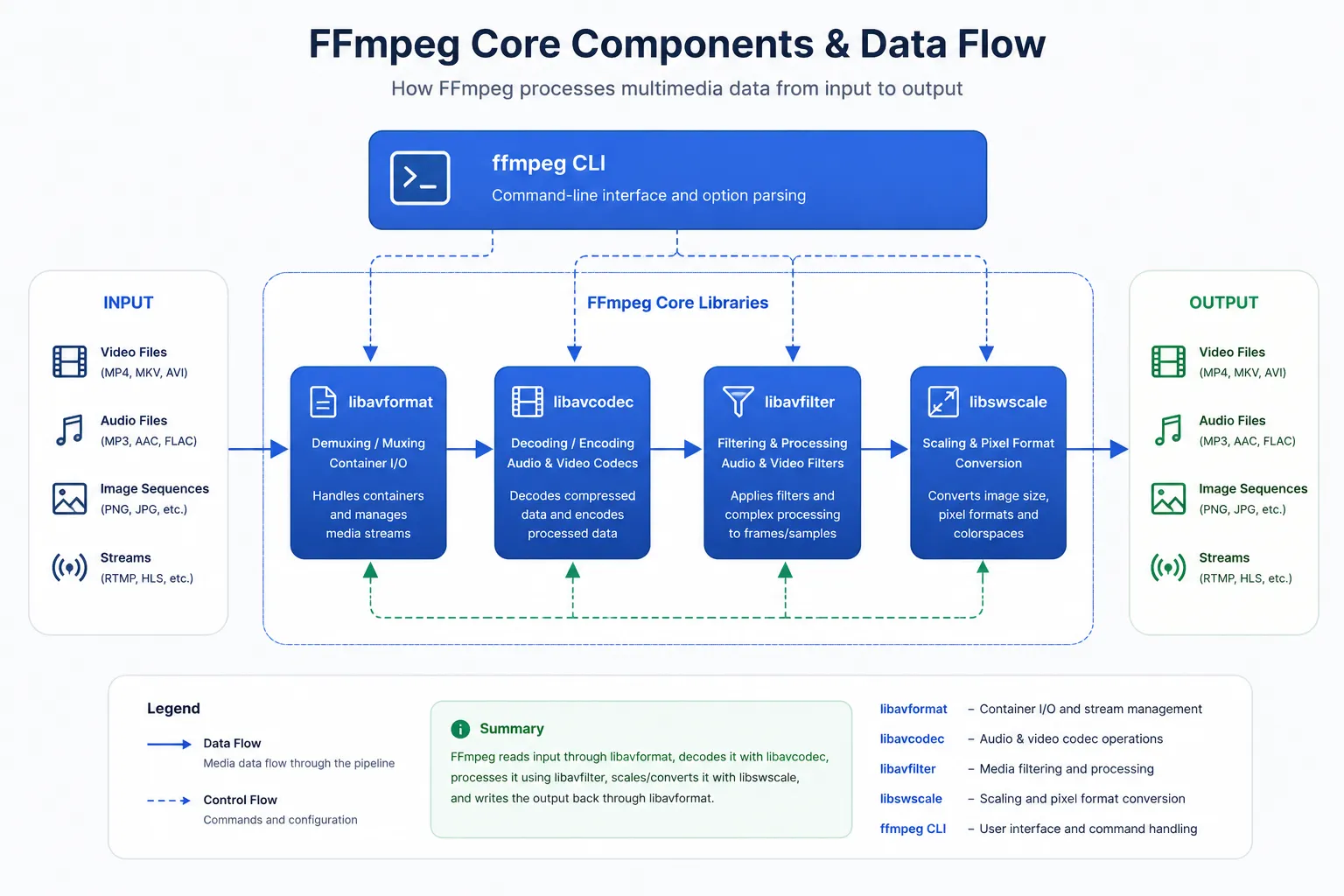
FFmpeg is not just one tool — it is a collection of libraries and command-line programs that work together:
- ffmpeg — The main transcoding tool that converts between formats
- ffplay — A minimal media player built on the FFmpeg libraries
- ffprobe — A stream analyzer that inspects multimedia file metadata
- libavcodec — The codec library with 100+ decoders and 80+ encoders
- libavformat — The muxer/demuxer library supporting 300+ container formats
- libavfilter — The audio/video filtering framework
- libswscale — Image scaling and pixel format conversion
- libswresample — Audio resampling and format conversion
What makes FFmpeg extraordinary isn't any single feature — it's the sheer comprehensiveness. If a multimedia format exists, FFmpeg almost certainly supports it. H.264, H.265/HEVC, AV1, VP9, VVC, ProRes, DNxHD, MPEG-2, Theora — the list goes on.
A Brief History: From Side Project to Global Infrastructure
FFmpeg was created in 2000 by French programmer Fabrice Bellard as a side project. It has since grown to become the most critical piece of open-source multimedia infrastructure on the planet.
Today, FFmpeg has 57,700+ GitHub stars, 1.5 million lines of code, and 2,400+ contributors across 8 major versions — yet it is maintained mostly by volunteers.
FFmpeg in 2026: What's New
2026 has been a massive year for FFmpeg. The project released two major updates packed with GPU acceleration and next-generation codec support.
FFmpeg 8.0 "Huffman" — August 2025
FFmpeg 8.0 was one of the largest releases in the project's history. Key highlights include:
- Native decoders: APV, ProRes RAW, RealVideo 6.0, Sanyo LD-ADPCM, G.728
- VVC decoder improvements: IBC, ACT, Palette Mode
- Vulkan compute-based codecs: FFv1 (encode and decode), ProRes RAW (decode only)
- Hardware accelerated decoding: Vulkan VP9, VAAPI VVC, OpenHarmony H264/5
- Hardware accelerated encoding: Vulkan AV1, OpenHarmony H264/5
- New filters: colordetect, pad_cuda, scale_d3d11, Whisper (AI transcription)
A new class of decoders and encoders based on pure Vulkan compute implementation was added. Rather than using custom hardware accelerators, these codecs are based on compute shaders and work on any implementation of Vulkan 1.3.
FFmpeg 8.1 "Hoare" — March 2026
FFmpeg 8.1 continued the momentum with even more GPU acceleration and codec support. Highlights include:
- Decoders: xHE-AAC Mps212 (experimental), MPEG-H decoding via libmpeghdec
- EXIF Metadata Parsing
- LCEVC: support for parsing and forwarding metadata
- Vulkan compute-based codecs: ProRes encoding and decoding, DPX decoding
- D3D12: H.264/AV1 encoding, scale_d3d12, mestimate_d3d12, deinterlace_d3d12 filters
- Rockchip H.264/HEVC hardware encoding
- IAMF: Projection mode Ambisonic Audio Elements muxing and demuxing
- New filters: drawvg, vpp_amf
FFmpeg 8.1 also introduced initial JPEG-XS support with a JPEG-XS parser as well as JPEG-XS encoding and decoding via the SVT-JPEG-XS project. Other changes include Direct3D 12 AV1 encoder support, EXIF metadata parsing, tiled HEIF support from the CLI, and experimental xHE-AAC MPS212 decoding support.
The release also features major Vulkan-related improvements: Apple ProRes Vulkan acceleration using compute shaders, Apple ProRes Vulkan-accelerated video encoding, Digital Picture Exchange (DPX) Vulkan hardware acceleration, and Vulkan software scale "swscale" support.
Vulkan Acceleration: The 2026 Theme
2026 has been the year of Vulkan for FFmpeg. Developer Lynne "Cyanreg" has been on a roll:
- January 2026: Merged Vulkan improvements including compile-time SPIR-V generation, pre-compiled shaders, Vulkan shader compression support, and long vector extension.
- April 2026: Implemented Vulkan-accelerated 360-degree video conversion — a major improvement over CPU-based conversion.
- May 2026: Added Vulkan accelerated decoding for APV video (Samsung's Advanced Professional Video Codec) and Apple ProRes RAW Vulkan acceleration.
FFmpeg developer Lynne "Cyanreg" implemented a 360-degree video conversion implementation powered by Vulkan compute for more efficient handling than just CPU-based conversion. This filter allows applying fisheye, dual fisheye, and other 360-degree projection of video content.
A companion post about the Vulkan Compute-based codec implementations was published on the Khronos Blog, featuring technical details on the implementations and future plans.
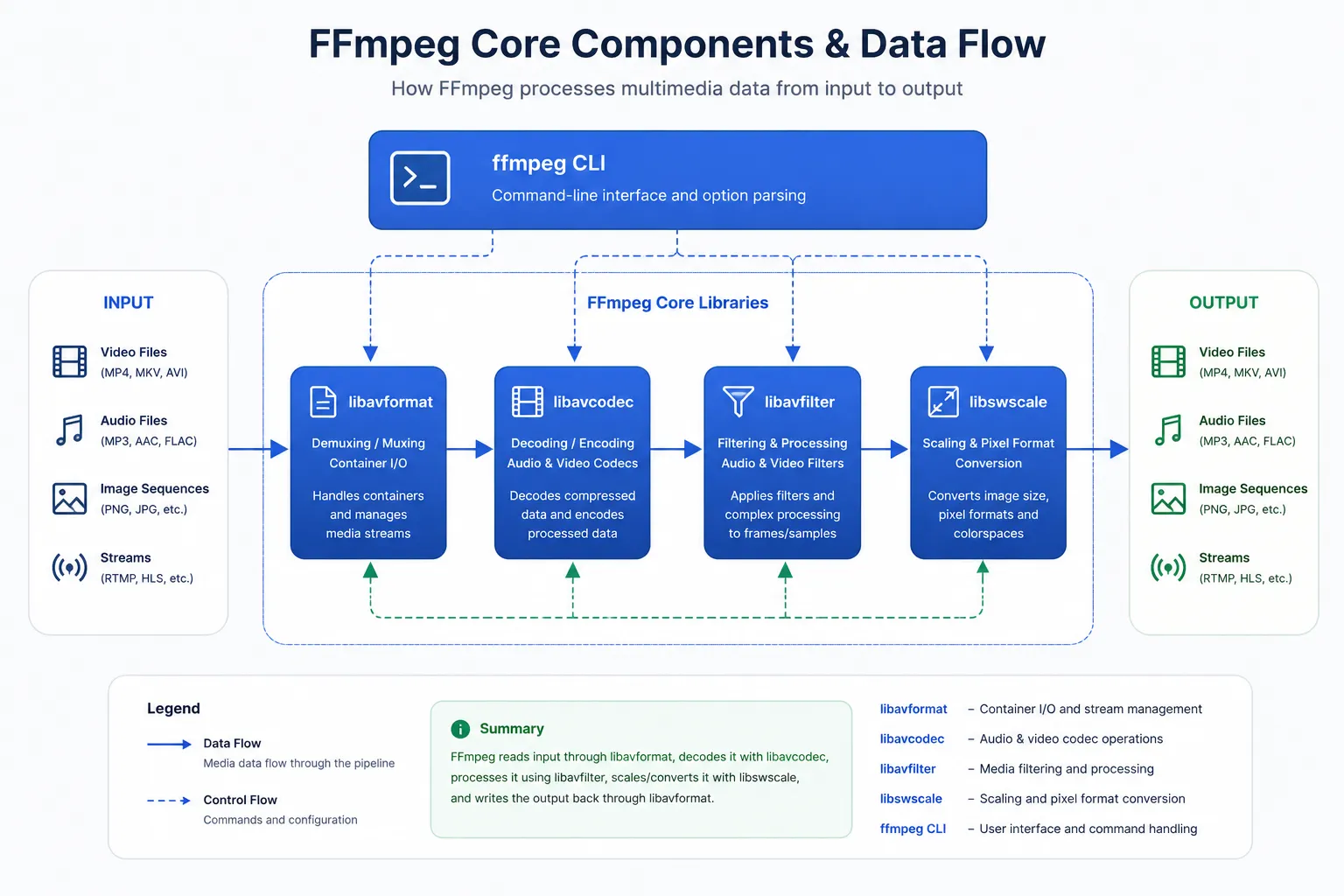
Image: FFmpeg's modular architecture — libavcodec, libavformat, libavfilter, and more.
How FFmpeg Is Used in the Real World
FFmpeg is everywhere. Here are some real-world use cases.
At Meta: Processing at Unimaginable Scale
Meta executes ffmpeg and ffprobe binaries tens of billions of times a day. When a user uploads a video through one of Meta's apps, FFmpeg generates a set of encodings to support Dynamic Adaptive Streaming over HTTP (DASH) playback.
Meta processes over 1 billion video uploads daily, each requiring multiple FFmpeg executions. To achieve this scale, Meta collaborated with FFmpeg developers, FFlabs, and VideoLAN to develop features like threaded multi-lane transcoding — allowing them to fully deprecate their internal FFmpeg fork and rely exclusively on the upstream version.
In Your Favorite Apps
FFmpeg is used behind the scenes by:
- VLC Media Player
- YouTube
- OBS Studio (the open-source streaming software)
- HandBrake (popular video transcoder with FFmpeg as its core engine)
- Blender (3D modeling software)
- Google Chrome and Firefox (audio/video playback)
- LosslessCut (lossless trimming tool using FFmpeg)
Even NASA's Perseverance rover uses FFmpeg.
Common FFmpeg Commands You Should Know
FFmpeg's power comes from its command-line interface. Here are the most useful commands.
Basic Format Conversion
The simplest FFmpeg command converts one format to another:
ffmpeg -i input.mp4 output.avi
Merge and Concatenate Videos
To merge multiple video clips into one file:
Method 1: Concat Demuxer (Fastest, same format)
Create a file list and run:
ffmpeg -f concat -safe 0 -i files.txt -c copy output.mp4
Method 2: Concat Filter (Different formats, re-encodes)
ffmpeg -i clip1.mp4 -i clip2.mov -filter_complex "[0:v][0:a][1:v][1:a]concat=n=2:v=1:a=1[outv][outa]" -map "[outv]" -map "[outa]" output.mp4
Screen Capture (Screenshot)
To capture a screenshot on Linux:
ffmpeg -f x11grab -video_size 1920x1080 -i $DISPLAY -vframes 1 screen.png
Screen Recording (With Audio)
To record your screen with audio on Linux:
ffmpeg -f x11grab -video_size 1920x1080 -framerate 25 -i $DISPLAY -f alsa -i default -c:v libx264 -preset ultrafast -c:a aac screen.mp4
Extract Audio from Video
To extract audio from a video file:
ffmpeg -i input.mp4 -q:a 0 -map a output.mp3
Trim/Cut Video
To cut a video from 00:00:30 to 00:01:30:
ffmpeg -i input.mp4 -ss 00:00:30 -to 00:01:30 -c copy output.mp4
How to Install FFmpeg
FFmpeg is available on all major platforms:
- macOS:
brew install ffmpeg - Ubuntu/Debian:
sudo apt update && sudo apt install ffmpeg - Windows: Download from ffmpeg.org, extract, and add to PATH
- Arch Linux:
sudo pacman -S ffmpeg
Why FFmpeg Matters in 2026
FFmpeg is not just a tool — it is a foundation. It is the reason we can watch video on almost any device, in almost any format, without thinking about the underlying complexity.
In 2026, FFmpeg continues to evolve with the industry. Vulkan acceleration is making video processing faster and more efficient than ever. New codecs like VVC and JPEG-XS are being integrated. AI-powered features like Whisper transcription are being added.
Meta processes over 1 billion video uploads daily using FFmpeg. Netflix relies on it for streaming. YouTube uses it for transcoding. NASA uses it on Mars.
And it is all powered by a small group of volunteers who believe in open-source software.
Final Thoughts
FFmpeg is the most important piece of software you have never heard of.
It processes more multimedia data than any software in history. It powers the apps you use every day — Netflix, YouTube, Discord, VLC. It is used by Meta, Google, NASA, and millions of developers worldwide.
And it is completely free. Open-source. Community-driven.
If you work with video, audio, or any kind of media — learn FFmpeg. It will save you hours. It will unlock capabilities you did not know existed. And it will give you a deeper appreciation for the open-source infrastructure that powers the internet.
The invisible engine behind every video on the internet. And it is only getting better.
WebStudioLabs covers the latest in open-source tools, multimedia technology, and developer infrastructure. Bookmark us for more deep dives into the tech that powers the digital world.
Check out Custom Web Application Development Service here